Eligibility check
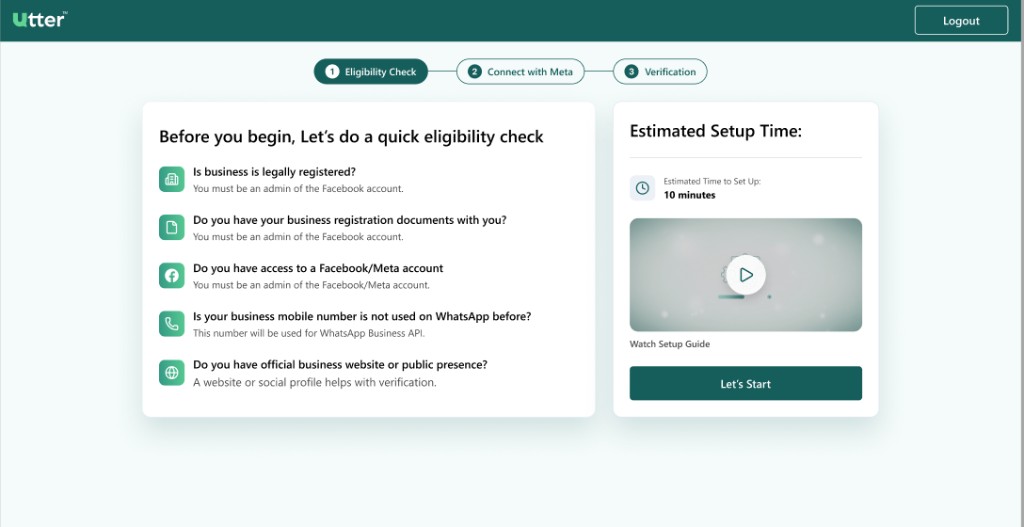
After you create your account, Utter shows a short Eligibility Check. This is step 1 of 3 in WhatsApp setup.
Why this step exists
Meta (Facebook) will ask for business and phone details. If something is missing, signup often fails or gets stuck in review. This screen helps you confirm you are ready before you open Meta.
Checklist — make sure you can say “yes”
| Question | Why it matters |
|---|---|
| Is your business legally registered? | Meta verifies real businesses. You should be an admin of the Facebook/Meta account you will use. |
| Do you have business registration documents? | Meta may ask for certificates, licenses, or similar proof. |
| Do you have access to a Facebook / Meta account? | You must be an admin of that account to create or select a WhatsApp Business Account. |
| Is your business mobile number unused on WhatsApp? | The number must not already be on WhatsApp or the WhatsApp Business App. It will be used for WhatsApp Business API. |
| Do you have a website or public presence? | A live website or public profile helps Meta verify your business. |
Estimated time
The right side of the screen shows about 10 minutes for the full Meta connection, if your information is ready.
You can also watch the Setup Guide video on this screen if available.
Continue
When you are ready:
- Review the checklist (or the full Onboarding Prerequisites)
- Click Let's Start
You move to step 2: Connect with Meta.