Business verification
This is step 3 of 3. After you connect with Meta, Utter shows your verification status while Meta reviews your business.
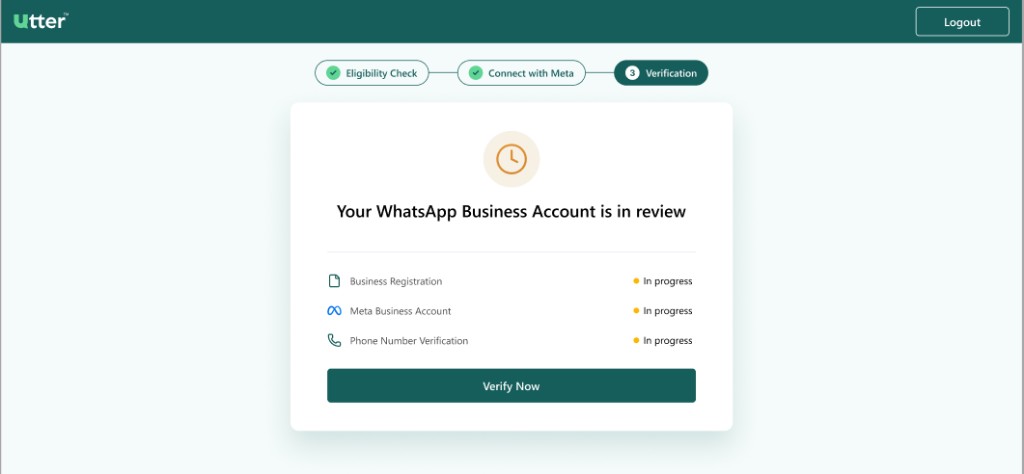
What is being verified?
Utter tracks three checks:
| Check | What Meta / Utter is confirming |
|---|---|
| Business Registration | Your company is a real, registered business and details look consistent |
| Meta Business Account | Your Meta/Facebook business portfolio is set up correctly and linked |
| Phone Number Verification | The phone number you added is verified for WhatsApp Business API use |
On the “in review” screen, items may show as In progress. That is normal right after signup.
What should you do while status is “In progress”?
- Keep this Utter page open or log back in later to check status
- Complete company verification on Meta Business Suite — see the full walkthrough: Submit business info on Meta
- Click Verify Now on the Utter screen when you need to continue or open verification actions
Verification is handled by Meta. Utter shows you the status so you know when you can start messaging.
Submit details on business.facebook.com
If Business Registration stays In progress or Pending, open Meta and finish verification there:
- Go to business.facebook.com
- Settings → Security Center → Start verification
- Enter legal business details and upload documents
- Confirm via email, phone, or domain
Full step-by-step with screenshots: Submit business info on Meta
What documents and info help approval?
Have these ready (upload in Meta if requested):
- Official business registration / incorporation certificate
- Legal business name (exactly as on documents)
- Business address matching documents and website
- Valid, clear scans (not blurry or expired)
- Live website or strong public presence with matching business name
- Phone number you control and already verified with OTP during signup
How long does verification take?
- Some businesses pass quickly after phone OTP and basic checks
- Others go to manual review and can take longer
- Delays often happen when names, addresses, or websites do not match documents
Possible outcomes
After review, you may see:
| Result | Meaning |
|---|---|
| All verified | You are ready to use WhatsApp in Utter |
| Something failed | Fix the failed item (often phone) and try again |
| Manual verification needed | Meta needs more review or clearer business proof |
Details and screenshots for each outcome: